Docs
Install KLYRN
One command on a fresh Ubuntu 24.04 LTS server. This page covers what the server needs, what the command does, and what to expect when it finishes.
Pre-release. The installer described here is real and runs on our development and test
servers. The release server it downloads from, get.klyrn.com, does not exist yet, so running the
command today installs nothing. Create an account or
join the waitlist to hear when the first signed release is published.
Requirements
The installer checks all of these in its first stage and stops with a plain message if one is not met.
- Operating system
- Ubuntu 24.04 LTS. Nothing else in V1; Debian 12 and 13 are planned for V1.5.
- Architecture
- x86_64 or arm64.
- Memory
- At least 1 GB. Under 4 GB, the installer creates a swap file if none exists.
- Disk
- At least 10 GB free.
- Access
- Root, with systemd, and outbound network access for apt, DNS and HTTPS.
- Ports
- 80, 443 and 7443 free. The panel listens on 7443 with its own TLS.
- Clean server
- No other control panel, no Apache, and no nginx or MariaDB with configuration KLYRN did not write. A fresh image is the expected starting point.
The install command
$ curl -fsSL https://get.klyrn.com | bash
Run it as root, or with sudo bash at the end instead of bash. The bootstrap script is short on purpose and does only four things:
- Checks that this is Ubuntu 24.04 on x86_64 or arm64, and that you are root.
- Downloads the release manifest and the
klyrnbinary for your architecture. - Verifies the binary's SHA-256 checksum and, for signed releases, the manifest's ed25519 signature. A mismatch stops everything.
- Hands over to
klyrn install. Every real step happens there, in Go, as a resumable and verifiable stage.
Three environment variables are honoured if you need them: KLYRN_CHANNEL (stable,
beta, dev), KLYRN_VERSION (default latest), and
KLYRN_DOWNLOAD_BASE for a mirror.
What the installer does
Eleven stages, in order. Each can check whether it already ran, apply itself, verify its own result and roll
back. State is saved after every transition to /var/lib/klyrn/install/state.json.
preflightVerifies every requirement above, plus that no conflicting panel or service is present.profileCollects CPU, RAM, swap, disk type, filesystem, virtualisation and kernel. Persisted; tuning derives from it.os-prepareapt update, base packages (ca-certificates curl gnupg acl unzip zstd tar rsync), swap file if RAM is under 4 GB and none exists. Timezone and unattended-upgrades are left as they are.identityCreates theklyrnsystem user and directories, generates the per-install secret key (/etc/klyrn/secret.key, mode 0600) andconfig.json.nginxInstalls nginx, takes ownership ofnginx.confgenerated from the profile, adds snippets, a default catch-all server and the ACME challenge location, then runsnginx -t.phpAdds the Ondřej Surý PPA with a pinned key fingerprint, installsphp8.3-fpmwith common extensions, sets KLYRN's global FPM defaults and disables the default pool.mariadbInstalls MariaDB 10.11 LTS, hardens it through typed SQL (no anonymous users, root over the Unix socket), writes a tuned50-klyrn.cnf.firewallufw with default deny inbound; allows the SSH port currently in use, 80, 443 and 7443. It never locks out the SSH port you are connected on.kernelA sysctl file with conservative network and filesystem limits from the profile, plus symlink and hardlink protections.servicessystemd units forklyrn-core(root) andklyrn-web(userklyrn), a self-signed panel certificate, enable and start.verifyEvery service is active, HTTPS on 7443 answers, the core socket answers, nginx serves the default page on 80, MariaDB accepts socket auth, PHP-FPM is up. Prints the one-time setup URL.
Known failure signatures (an apt lock held, the PPA unreachable, a port in use, an interrupted dpkg) map to a
diagnosis and a safe automatic remedy: wait for the lock, dpkg --configure -a, retry with
back-off. Unknown failures stop, keep their state, and print the exact stage and log path. On the first clean
run of the test VPS (3 vCPU, 5.9 GB) all eleven stages verified in 53 seconds.
After it finishes
The last lines of output are the panel URL on https://<your-server-ip>:7443 and a
one-time setup token. Open the URL, accept the self-signed certificate (a real one replaces it once the
panel has a hostname), and create the first admin account. The token is printed once on the console and
never stored as a default credential; the setup endpoint is disabled as soon as the first admin exists.
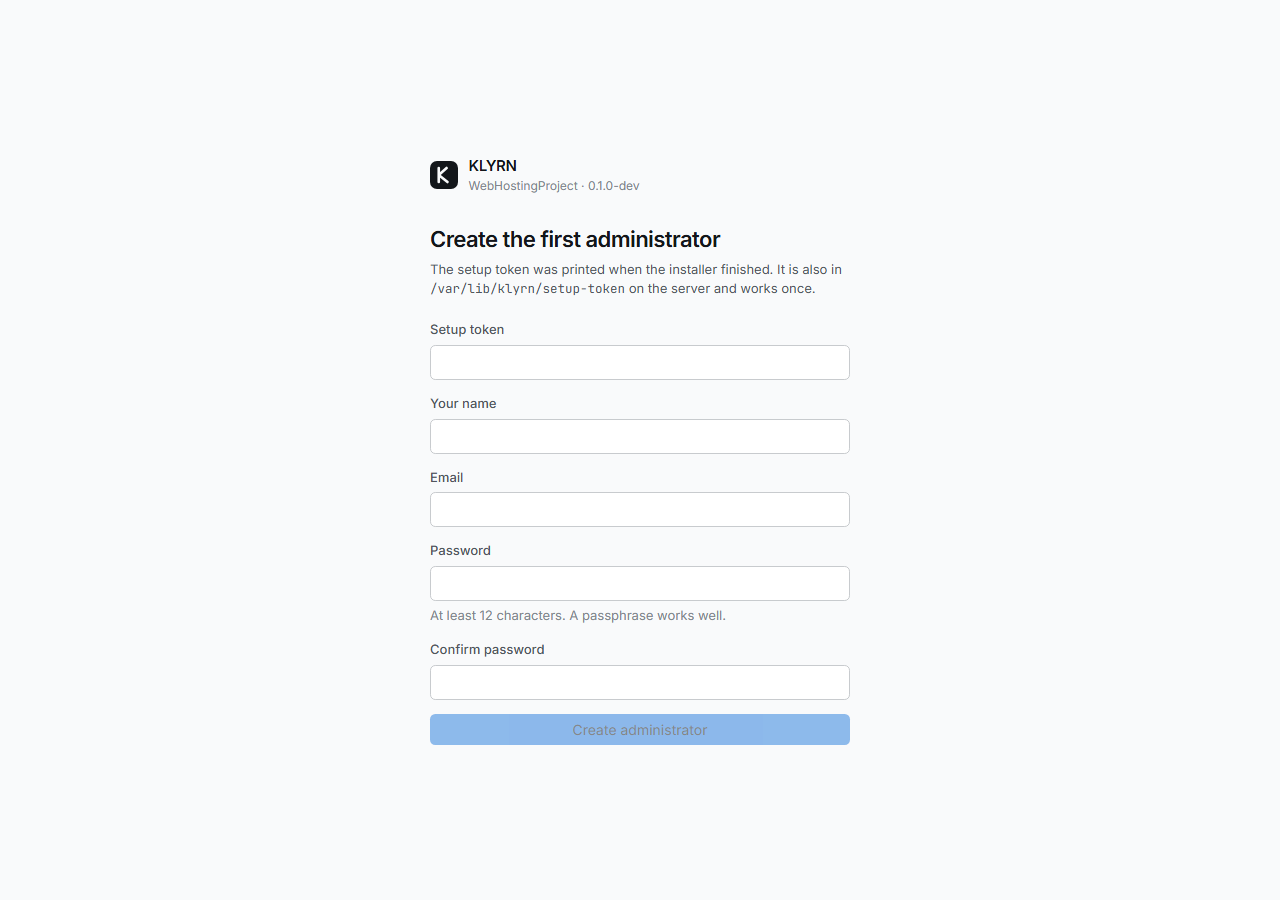
From a shell on the server, the same information is one command away:
klyrn status          # services, versions, resource use
klyrn health          # every check and its last result
klyrn health --events # repairs the health engine attempted, and why
klyrn profile         # the server profile and every tuned value with its reason
klyrn install --plan  # each installer stage and its state
Running it again
Running the install command a second time on a finished server is a no-op: every stage reports itself as
already done and nothing changes. If the previous run was interrupted, it resumes from the first stage that
did not verify. If the binary on the server is newer than the one that installed it, only the stages that
depend on the binary re-apply. This is what that looked like on the development server after a new build
was pushed: identity in 53 ms, services in 263 ms, everything else skipped.
# klyrn install

KLYRN installer 0.1.0-dev

  · Checking this server                     already done
  · Profiling hardware and deriving tuning   already done
  · Preparing the operating system           already done
  ✔ Creating KLYRN user, directories and keys 53ms
  · Installing and configuring nginx         already done
  · Installing PHP 8.3 (FPM)                 already done
  · Installing and securing MariaDB          already done
  · Configuring the firewall (ufw)           already done
  · Applying kernel network and filesystem limits already done
  ✔ Starting KLYRN services                  263ms
  · Verifying the complete installation      already done

  KLYRN is installed and verified.

  Panel:        https://51.75.165.38:7443
  Setup is already complete; sign in with your administrator account.

  CLI:          klyrn status | klyrn health | klyrn install --plan
klyrn install --rollback walks back completed stages in reverse order, best effort, for the stages that changed state. Packages stay installed; KLYRN's files, units and firewall rules are removed.
Where things live
/opt/klyrn/releases/<ver>/klyrn   immutable release binaries
/opt/klyrn/bin/klyrn              symlink to the current release
/opt/klyrn/runtimes/node/<ver>/   Node.js runtimes, checksum-verified
/etc/klyrn/config.json            small, human-editable
/etc/klyrn/secret.key             encryption key, mode 0600
/etc/nginx/nginx.conf             KLYRN-owned, generated from the profile
/etc/nginx/klyrn/                 generated snippets and sites
/var/lib/klyrn/klyrn.db           panel state (SQLite, root only)
/var/lib/klyrn/backups/           local backup destination
/var/log/klyrn/                   structured logs
/run/klyrn/core.sock              core RPC socket, 0660 root:klyrn
/home/<account>/sites/<domain>/public
/home/<account>/apps/<app>/
/home/<account>/logs/<domain>.{access,error}.log
Updates swap the bin/klyrn symlink between releases; the previous release is kept, so a failed update rolls back automatically.
Further reading
- The security model in plain language: what the web tier cannot do, how accounts are isolated, what is not covered yet.
- How the health engine repairs a server, with the recorded circuit-breaker sequence.
- Editions and limits.
Reference documentation for the panel, the CLI and the API is published with the first release.